
When comparing Meta Business Suite vs Business Portfolio, it helps to think of one as your “creative desk” and the other as your “secure vault.” If you feel like you’re constantly clicking between different screens just to post a Reel or check an ad, you aren’t alone.
Meta’s business tools are often confused because their features are so closely connected. In fact, they even share parts of the same interface, making them feel interchangeable at first glance. However, once you dig in, you’ll see they serve two very different masters.
- Meta Business Portfolio is the backend of your business. This is where you handle asset ownership, user access, security, billing, and high-level settings. If you’ve been searching for the difference between Meta Business Portfolio vs Business Manager, the “Portfolio” is essentially the new-and-improved home for those administrative controls.
- Meta Business Suite, on the other hand, is built for your day-to-day workflow. This is where you’ll find the most popular Facebook Business Suite features, such as publishing content, replying to messages, and checking your latest insights. Here’s a guide on how to use Meta Business Suite.
Understanding this distinction is vital, whether you’re a solo founder or managing accounts for clients. It affects how your assets are protected and how easily your team can work without hitting “permission denied” roadblocks.
In this guide, we’ll break down exactly how these two tools work together and when you should use each.
What is Meta Business Portfolio? (The “Back-Office” Hub)

Think of the Meta Business Portfolio as the central command center for your brand. It is a specialized hub designed to manage your business’s assets and user access across all of Meta’s platforms in one secure place.
The biggest advantage here is organization. It allows you to house your Facebook Pages, Instagram accounts, ad accounts, and catalogues under one roof. This setup significantly reduces the risky habit of password sharing and eliminates the need for team members to constantly switch between personal accounts to get work done.
Inside the Portfolio: Control and Security
When you step into your Business Portfolio, you’ll find a settings-style dashboard where you can:
- Manage People & Partners: Easily add teammates or external agencies without giving them your personal login.
- Assign Roles: Give specific permissions (like “Viewer” or “Admin”) at both the high portfolio level and for individual assets.
- Oversee Assets: Keep an eye on your ad accounts, pixels, and product catalogues in one view.
- Brand Safety: Access data sources, verify domains, and manage your security settings.
One of the most powerful Facebook Business Suite features is actually its deep integration with this portfolio—whenever you need to change “who can do what,” the Suite will move you over here to handle the heavy lifting.
The 2026 Shift: Meta Business Portfolio vs. Business Manager
If you are looking for the old “Business Manager,” don’t worry—you’re in the right place. In a major branding update, Meta renamed Business Manager to Meta Business Portfolio.
While you might still see the old name in some older help articles, “Business Portfolio” is the current interface, and all the old links now redirect here.
Understanding the Meta Business Suite vs Business Portfolio distinction is key: the Portfolio ensures your assets are owned by the business itself, not a personal profile.
For larger organizations, Meta has even introduced Managed Meta Accounts, which allow employees to log in with work emails instead of personal Facebook accounts, keeping your professional and private lives completely separate.
When is a Meta Business Portfolio Necessary?

Think of the Meta Business Portfolio as the legal and structural foundation of your company on Meta. While you might spend most of your time using the day-to-day Facebook Business Suite features, you actually need a Business Portfolio to unlock the full professional power of the platform.
You’ll find a Business Portfolio is required if you want to:
- Connect Your Ecosystem: The Meta Business Suite actually relies on a Business Portfolio to “tether” your Facebook Pages, Instagram accounts, and WhatsApp numbers together in one place. For example, in hospitality, this backend organization is the difference between a missed connection and a confirmed reservation. Managing hotel marketing in 2026 requires a perfectly synced ecosystem of tracking pixels, ad accounts, and location pages to ensure your ‘Book Now’ buttons are actually working.
- Take Control of Advertising: While you can “boost” a post from your phone, full-scale ad accounts, pixel tracking, and professional billing are all owned at the portfolio level.
- Manage Meta Shops & Commerce: If you want to sell products directly on Facebook or Instagram, a Business Portfolio is mandatory for managing your catalogues and commerce settings.
- Secure Your Brand: High-level security tasks, like verifying your website domain or setting up two-factor authentication for your whole team, happen here rather than on personal accounts.
- Professionalize Your Billing: Advanced options like monthly invoicing and shared payment methods across multiple ad accounts are only available through a Portfolio.
- Handle Sensitive Campaigns: If you plan to run ads related to social issues, elections, or politics, the additional identity verification required must be completed within your Portfolio.
The Team Factor: Meta Business Portfolio vs. Business Manager
One of the most common reasons to set this up is for collaboration. Whether you are comparing Meta Business Portfolio vs Business Manager, the goal remains the same: security.
A Portfolio allows you to grant access to agencies or new hires without ever sharing your personal Facebook password.
As your brand grows, the Meta Business Suite vs Business Portfolio relationship becomes even more important.
The Portfolio keeps your assets organized and protected, ensuring that the business—not an individual—retains ownership of every Page and Ad Account you’ve worked hard to build.
What is Meta Business Suite? (The “Daily Desk”)

If the Portfolio is your office building, Meta Business Suite is the desk where you actually get the work done. It is a free, centralized workspace designed to help you manage your day-to-day social media tasks without jumping between different apps or devices.
The primary goal of the Suite is to save you time. By bringing your Facebook Page and Instagram professional account into one view, you can see exactly what is happening with your brand at a glance.
Key Facebook Business Suite Features
Inside the Suite, you have access to the “fun” side of social media management. You can:
- Plan & Publish: Create, schedule, and publish posts, stories, and Reels for both Facebook and Instagram simultaneously.
- Unified Inbox: Manage all your messages and comments from Facebook, Instagram, Messenger, and even WhatsApp Business in one single place.
- Smart Insights: View real-time data on how your content is performing and who your audience is.
- Simplified Ads: Create “boosted” posts or simple ad campaigns and track their basic performance without needing to be an ads expert.
- Direct Shortcuts: Access more advanced tools, like the full Ads Manager, with just one click.
Meta Business Suite vs Business Portfolio: Where Do You Work?
It’s easy to see why people get confused when looking at Meta Business Portfolio vs Business Manager, but the easiest way to remember the Suite’s role is by its focus on content.
While the Portfolio handles your “keys” (access and ownership), the Suite is where you “drive” the car. Using the latest Facebook Business Suite features like the drag-and-drop Planner or automated “Saved Replies” for your inbox allows you to stay consistent and responsive without feeling overwhelmed.
In the 2026 landscape of social media, the Meta Business Suite vs Business Portfolio duo is your best defense against burnout. You use the Portfolio once to set things up securely, and you use the Suite every day to grow your community.
When Do You Need Meta Business Suite?

If your daily to-do list involves posting content or replying to customers, you’ll likely spend 90% of your time in the Meta Business Suite.
It is the go-to tool for anyone who manages Facebook Pages or Instagram business accounts and needs to keep their engagement consistent.
When comparing Meta Business Suite vs Business Portfolio, think of the Suite as your “Active Workspace.” You’ll find it’s the best tool for the job if you:
- Publish as a Brand: You need to post content as a professional business entity rather than from a personal profile.
- Plan and Schedule Ahead: If you want to maintain a consistent presence without logging in every single day, the content calendar and scheduler are life-saving Facebook Business Suite features.
- Manage Engagement at Scale: Instead of jumping between three different apps, you can use a unified inbox to respond to Facebook comments, Instagram DMs, and WhatsApp Business messages in one place.
- Need Simple Insights: If you want to track what’s working without getting lost in “Big Data,” the Suite provides clear, easy-to-read performance metrics for your latest posts.
- Collaborate Safely: It allows internal teams or marketing agencies to draft posts and reply to messages without ever needing your personal Facebook password.
The Meta Business Suite vs Business Portfolio Workflow
Even when comparing Meta Business Portfolio vs Business Manager, the “Suite” remains the front-end star. While the Portfolio handles the legal “ownership” of your brand, the Facebook Business Suite features are what actually help you grow your audience.
In short: Use the Portfolio to set up your permissions, and use the Suite to build your business.
Meta Business Suite vs. Meta Business Portfolio: Feature Comparison
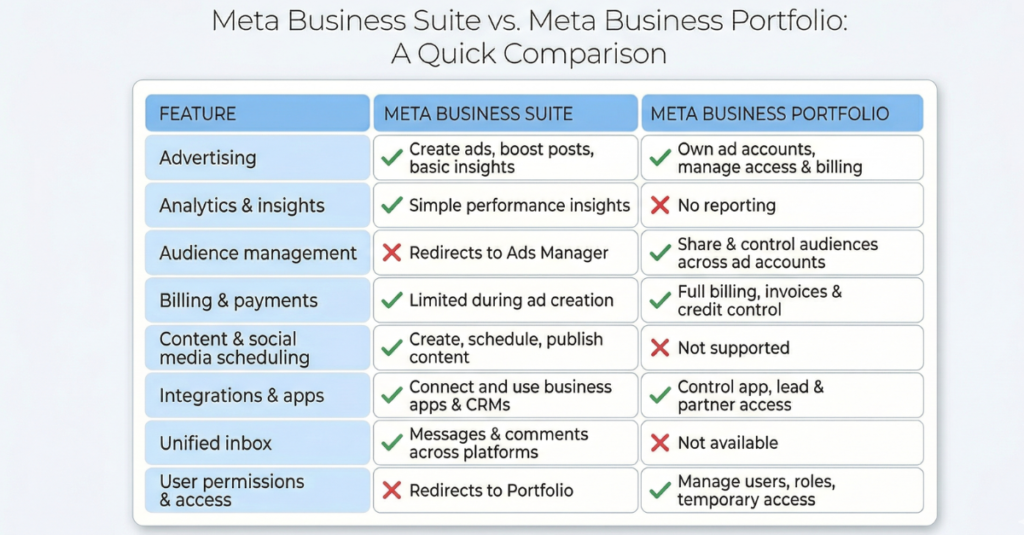
While Meta Business Suite and Meta Business Portfolio are closely linked, they play very different roles in your digital strategy. Even though you often access your Portfolio settings through the Suite interface, it’s important to know which tool is actually doing the work.
On the other hand, if you don’t want to go through all the trouble of learning every little detail, checking out the 2026 Social Media Management pricing is also a great choice.
1. User Permissions and Access Control
When it comes to security and “who sees what,” the Meta Business Portfolio is in charge. This is the administrative heart of your business where you control permissions at every level.
Inside a Business Portfolio, you can:
- Add Partners: Securely bring in teammates or external agencies.
- Level-Up Access: Choose between Portfolio-level access (managing the whole business) or Asset-level access (controlling a specific Page or Ad Account).
- Granular Controls: Assign “Finance” permissions for billing or set Temporary Access for short-term projects.
The Key Difference: When comparing Meta Business Portfolio vs Business Manager, the Portfolio remains the only place to handle these “back-end” logistics. In fact, if you try to manage permissions inside the Suite, you’ll notice a redirect that sends you straight back to your Portfolio settings.
This layer of security is especially non-negotiable for medical professionals. When it comes to social media for Doctors, the line between personal privacy and professional authority must be absolute. Utilizing a Portfolio ensures a practice owner never has to share personal login credentials with staff or agencies.
While you use Facebook Business Suite features to talk to your customers, you use the Portfolio to protect your brand.
2. Scheduling and Content Management
This is where the Meta Business Suite truly shines. It is your daily “Content Command Center” for everything creative and social.
With the Meta Business Suite, you can:
- Cross-Post with Ease: Create and schedule posts for both Facebook and Instagram simultaneously.
- Visualize Your Strategy: Use a shared content calendar to plan your feed weeks in advance.
- Master Your Inbox: Reply to every DM and comment from Facebook, Instagram, Messenger, and WhatsApp in one unified view.
- Track Growth: View high-level insights to see which Posts or Reels are actually resonating with your audience.
The Key Difference: In the Meta Business Suite vs Business Portfolio breakdown, the Portfolio doesn’t handle content at all. Instead, it acts as the “connector.” You use the Portfolio to link your Instagram account to your Facebook Page so that the Facebook Business Suite features can actually work across both platforms.
3. The Unified Inbox: Managing Conversations
The Meta Business Suite is home to one of the most popular Facebook Business Suite features: the Unified Inbox. This tool pulls messages and comments from Facebook, Instagram, Messenger, and WhatsApp Business into one single screen.
- In the Suite: You can read and reply to DMs, filter conversations by “unread” or “follow-up,” and even set up automated “Away” messages.
- In the Portfolio: The Meta Business Portfolio does not have an inbox. It simply ensures that the right people have the permission to see that inbox.
When comparing Meta Business Portfolio vs Business Manager, remember that the Portfolio’s job is to make sure your team has the keys to the front door, but the Suite is where they actually talk to the guests.
4. Creating and Managing Ads
This is where the line between “simple” and “advanced” is drawn.
- Meta Business Suite is your entry point for advertising. It allows you to boost posts and create simple ads for Facebook and Instagram. It’s perfect for quick wins and tracking basic performance.
- Meta Business Portfolio doesn’t actually create the ads, but it owns the Ad Account. This is where you handle billing, manage pixel datasets, and decide which agency or employee has the right to spend your budget.
The Strategy: You use the Portfolio to secure your financial assets and the Suite (or the more advanced Ads Manager) to launch your creative campaigns.
5. Audience Targeting and Management
Data is the lifeblood of modern marketing, and how you manage it depends on which tool you use.
- Inside the Portfolio: This is where audience ownership lives. If you want to share a “Lookalike Audience” between two different ad accounts or give an agency access to your customer data, you do it in the Meta Business Portfolio.
- Inside the Suite: You are limited to basic Facebook Business Suite features, like selecting age, gender, and location for a simple boosted post. For anything more advanced, the Suite will redirect you to the deeper targeting tools in Ads Manager.
6. Analytics and Insights: Measuring Your Success
When it comes to seeing if your hard work is actually paying off, the Meta Business Suite is your go-to dashboard. It is designed to be the “easy-to-read” version of your data, perfect for quick daily check-ins.
- Inside the Suite: You get a high-level overview of your Facebook Page and Instagram performance. You can track Reel reach, follower growth, and even see how your audience demographics (like age and location) are shifting. These Facebook Business Suite features help you decide what to post next based on what’s actually working.
- Inside the Portfolio: The Meta Business Portfolio doesn’t actually provide reporting. While it “owns” the accounts that generate the data, you’ll always be redirected back to the Suite or Ads Manager to actually read the charts.
7. Billing and Payments: The Financial Heart
While the Suite is for growth, the Meta Business Portfolio is for the “Business” side of things. This is where you manage your money, credit lines, and invoices.
In the Portfolio, you can:
- Centralize Payments: Manage credit cards, PayPal, or lines of credit across all your ad accounts in one place.
- Professional Invoicing: If you’re a larger brand or agency, this is where you handle monthly invoicing and track transaction histories.
- Control Spending: Set account-level spending limits so your team or agency doesn’t accidentally go over budget.
The Key Difference: The Meta Business Suite has no dedicated billing area. If you try to update your payment method there, it will simply act as a shortcut that sends you back to your Portfolio settings. Whether you are looking at Meta Business Portfolio vs Business Manager, this financial control remains the most critical “back-end” function you need to set up correctly.
8. The Mobile Experience: Meta Business Suite on the Go
If you want to manage your business from your phone, you have one primary option.
- Meta Business Suite has a dedicated mobile app for both iOS and Android. It is packed with Facebook Business Suite features that allow you to check notifications, reply to DMs, boost recent posts, and view quick insights while you’re away from your computer.
- Meta Business Portfolio does not have a standalone mobile app. While you can access some portfolio settings through the Business Suite app, the heavy-duty administrative work is still best handled on a desktop browser.
How to Switch Between Tools (The Secret Shortcuts)
Sometimes you’ll be in the “creative” mode of the Suite and realize you need to change a “technical” setting in the Portfolio.
Here is exactly how to jump between them:
From Meta Business Suite to Business Portfolio
If you are in the Suite and need to manage your “Back-Office” settings:
- Click “Help” in the bottom-left corner of your desktop screen.
- Select “Go to Business Manager.” > Note: Even though we are comparing Meta Business Portfolio vs Business Manager, you’ll notice that Meta’s own buttons sometimes still use the old name. Clicking this will take you exactly where you need to go: your Business Portfolio.
From Business Portfolio back to Meta Business Suite
If you’ve finished updating your billing or permissions and want to get back to your content:
- Click the “All Tools” (three-line menu) icon in the top-left corner.
- Select “Meta Business Suite.” You’ll be instantly transported back to your dashboard to manage your messages, Reels, and ads.
Your Roadmap to Meta Success

Navigating the Meta Business Suite vs Business Portfolio divide is about more than just knowing where to click—it’s about protecting your brand’s assets while growing its voice.
As we’ve seen, the Meta Business Portfolio is your foundation for security, billing, and team permissions.
Meanwhile, the Facebook Business Suite features like the unified inbox and content planner are your tools for daily connection. When used together correctly, they transform your social media from a chore into a growth engine.
Stop Struggling with Settings—Start Growing Your Brand
Let’s be honest: you started your business to serve your customers, not to spend 20 hours a week troubleshooting “Meta Business Portfolio vs Business Manager” redirects or figuring out ad pixels.
Managing professional social media in 2026 requires a deep understanding of technical backend security and creative front-end engagement. That’s where we come in.
We specialize in:
- Total Portfolio Management: We handle the technical setup, security, and permissions so your assets are always protected.
- Content Mastery: We leverage the best Facebook Business Suite features to create, schedule, and manage high-impact content that actually resonates.
- Data-Driven Growth: We don’t just “post and pray.” We use advanced analytics to ensure your ad spend and organic efforts are delivering a real ROI.
Ready to take social media off your to-do list? Contact us today and let us handle the Meta Maze while you focus on running your business.